Chrome’s New AI Sidebar: Google Challenges Specialized AI Browsers with Gemini Integration




Google has announced a fundamental expansion of AI capabilities in its Chrome browser. The integration based on the Gemini-3 model is initially available to users of MacOS, Windows, and Chromebook Plus. The company is introducing a new sidebar interface that replaces the previous pop-up dialog and is intended to enable continuous support during browser use. The central new feature is called Auto Browse and is initially aimed exclusively at subscribers of Google AI Pro and Google AI Ultra services in the United States. In Europe, the availability of the new features remains limited for now.
The concept of a sidebar on the right for AI chat is already known from AI browsers like Perplexity Comet or ChatGPT Atlas. Despite major announcements, however, such AI browsers have not yet been a major success.
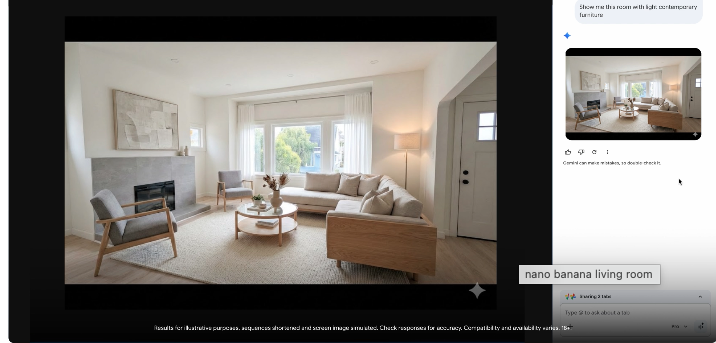
The newly designed sidebar allows users to access AI assistance in parallel while working in open tabs. The system can compare information across multiple websites, summarize product reviews, or coordinate appointments without requiring switching between different browser tabs. Additionally, Google has integrated the image generator Nano Banana directly into the Chrome sidebar. This allows users to analyze, transform, or generate images based on text input without having to download files or edit them in separate applications. The tool can, for example, visualize room designs or convert data into graphical representations.
Automated Task Completion through AI Agents
With Auto Browse, Google is introducing an agentic functionality that goes well beyond previous autofill technology. The system can independently perform complex multi-step processes, including research on hotel and flight prices over various time periods, scheduling appointments with service providers, filling out extensive online forms, or managing subscriptions. In tests, the function was also used for tasks such as compiling tax documents, checking payment receipts, or renewing driver’s licenses. The multimodal capabilities of Gemini 3 also enable the system to process visual information: when planning a themed party, Auto Browse can identify elements in a reference image, research corresponding items, and add them to a shopping cart while taking a set budget into account. If desired, the system can also access the Google Password Manager to log into websites and perform actions there.
The integration of connected Google services significantly expands the range of functions. Gemini in Chrome can access Gmail, Google Calendar, YouTube, Google Maps, Google Shopping, and Google Flights, provided users enable these connections in the settings. This makes it possible for the system to, for example, extract event details from older emails, cross-reference flight information, and then draft responses to emails. The Nano Banana function works directly with images from the current browser window without requiring additional upload steps. During shopping transactions, the system can also apply discount codes and perform price comparisons.
Availability and Future Developments
The new features are being rolled out gradually, with Auto Browse initially reserved exclusively for paying subscribers in the US. In regions where the sidebar is not yet available, users can activate Gemini via the address bar by typing @gemini and pressing Enter. For the coming months, Google has announced the introduction of Personal Intelligence in Chrome. This feature, which is already available in the Gemini app, is intended to take into account the context of previous interactions and thereby provide more personalized responses. Users can enter specific instructions to further customize the system’s responses. Activation remains optional, and connected apps can be disconnected at any time.
Google emphasizes the security architecture of the new features and points to special protection mechanisms against novel online threats. Auto Browse explicitly requests confirmation for sensitive actions such as purchases or social media posts. Furthermore, Chrome supports the Universal Commerce Protocol, a new open standard for agentic action in e-commerce that Google has developed together with Shopify, Etsy, Wayfair, and Target. This standard is intended to ensure that AI agents can act seamlessly on behalf of users. The development positions Chrome in an increasingly competitive market for AI-powered browsers, in which providers such as Perplexity with Comet and OpenAI with Atlas are also active. The new features mark a shift from pure information queries to active support for complex workflows.